February 23, 2026
Secrets to preventing tangled cables during moving
Few moving day annoyances rival opening a box and finding a knot of power cords, HDMI leads, chargers, and mystery cables that seem fused together. Untangling them wastes time, risks damaging connectors, and adds unnecessary stress when you just want your internet and TV working again. The good news is that tangled cables are almost always the result of predictable handling mistakes, and a few smart habits can prevent the mess entirely.
The problem is more common than people think. The Consumer Technology Association reports that the average household now owns more than 20 connected devices, each with at least one power cable and often multiple data cords. That easily puts most homes at 40 to 60 loose cables once you count adapters, extension cords, routers, monitors, and chargers. When all of those are tossed loosely into boxes, friction, vibration, and compression naturally twist them together.
Physics explains why tangling happens so easily. Flexible cables behave like long soft springs. During transport, vibration causes repeated micro movements that allow loops to slip over one another. Packaging vibration studies show that even low level vibration over several hours can create significant internal movement inside boxes. That constant motion tightens knots that started as harmless overlaps. The longer the drive and the looser the packing, the worse the tangling becomes.
Cable durability is also at stake. Data cable manufacturers warn that repeated sharp bending and twisting can reduce cable lifespan by more than 50 percent due to conductor fatigue and micro cracking of insulation. When cables are tangled tightly, people often pull hard to separate them, which stresses connectors and internal wires. Replacing a few damaged cables may seem minor, but over time it adds up in cost and frustration.
The first secret is treating cables as individual items rather than a loose group. Each cable should be coiled intentionally using a loose loop that respects the natural bend radius of the wire. Tight coils create internal stress and increase the chance of kinks. Electronics industry guidelines recommend avoiding bends tighter than about ten times the cable diameter for long term durability. Loose, even loops preserve conductor integrity and make future uncoiling smoother.
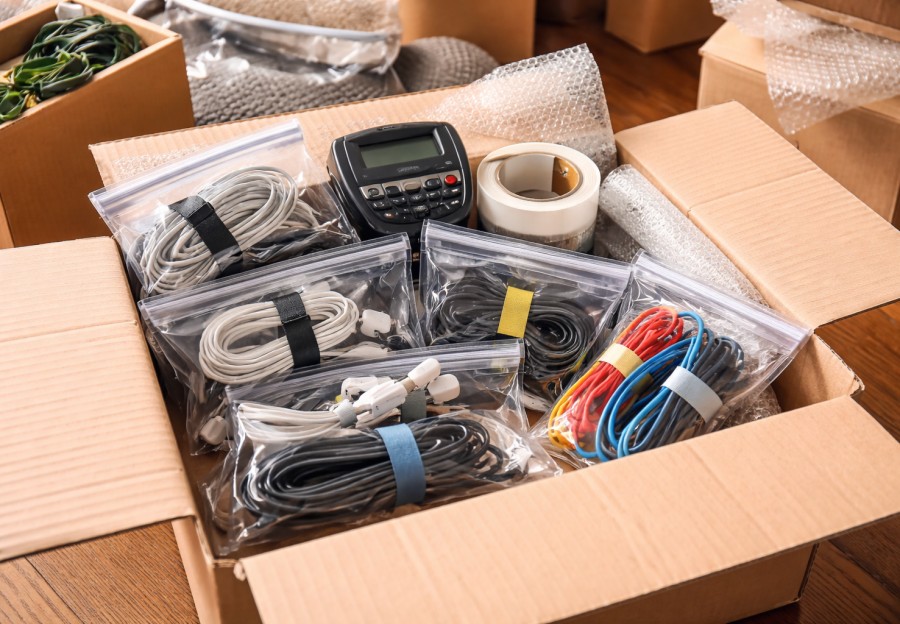
Once coiled, each cable should be lightly secured so the loops cannot unwind. Soft ties, reusable hook and loop straps, or even rubber bands used gently keep coils stable without crushing insulation. Avoid hard tape directly on cables because adhesive residue attracts dust and can degrade insulation over time. Packaging material testing shows that adhesive residue increases friction between surfaces, which actually encourages tangling later when cables rub against each other.
Labeling is another quiet time saver. When cables look similar, people tend to test plug combinations until something fits, which risks port damage. Clear labels on both ends of important cables prevent guessing. Logistics studies show that visual identification reduces handling errors by up to 30 percent in sorting environments. At home, that means faster setup and fewer forced connections.
The second secret is separation by function. Power cords generate more stiffness and weight than thin data cables. When mixed together, heavier cords naturally sink and twist around lighter ones. Separating power cables from signal cables reduces that interaction. This mirrors warehouse cable management practices where heavier lines are routed separately to reduce wear and interference.
Small containers work better than large boxes for cable storage. When many coils share a big box, movement space increases and tangling risk rises. Packing cables into smaller pouches, zip bags, or divided containers limits motion and keeps each group contained. Packaging engineers consistently show that reducing internal void space lowers movement and damage rates during transport.
The third secret involves controlling vibration and compression. Cables packed at the bottom of heavy boxes get squeezed and distorted. Over time, compression forces cables to deform and interlock. Transport studies show that stacked loads can generate significant pressure at lower layers, especially during braking. Keeping cable boxes light and placing them near the top of stacks reduces mechanical stress.
Using soft filler material inside cable containers also helps. Light padding prevents coils from shifting and absorbing vibration energy. Packaging vibration research demonstrates that cushioning materials dampen micro movement and reduce internal abrasion. Even simple paper or fabric layers can stabilize coils effectively.
Humidity and temperature deserve attention too. Plastic insulation becomes more flexible in heat and more brittle in cold. Vehicle interior temperature studies show that closed vehicles can exceed outdoor temperatures by more than 20 degrees Celsius within an hour under sun exposure. Excess heat increases cable pliability, which allows coils to deform and tangle more easily under vibration. Packing cables away from truck walls and avoiding sealed hot compartments protects insulation and shape.
The fourth secret is keeping adapters and small accessories with their matching cables. Loose adapters rolling around inside a cable box create snag points that hook loops and tighten knots. Storing adapters in small bags attached to the cable coil prevents this interaction. Consumer electronics damage claims often cite missing or mismatched adapters as a frequent frustration after moves, which adds replacement cost and setup delays.
For long cables like extension cords or ethernet runs, figure eight coiling helps prevent internal twist buildup. This technique alternates loop direction, balancing torsion in the cable. Audio engineering studies and broadcast industry standards recommend figure eight coiling for long cables because it reduces internal memory and tangling over repeated use.
Another important factor is how cables are staged before loading. If cables are left loose on floors or furniture during packing, they collect dust and debris that increases friction. The American Cleaning Institute notes that fine grit particles act as abrasives on surfaces, which also increases the chance of fibers and cables sticking together. Keeping cables clean and contained from the moment they are disconnected reduces this friction effect.
Transport placement inside the truck also matters. Cables should not be stored near heavy vibrating equipment like generators, tool boxes, or appliance motors. Mechanical vibration frequency varies across the truck, and areas near heavy rigid loads often experience higher vibration amplitude. Packaging lab testing shows that vibration hotspots increase internal movement and wear. Placing cable containers in more stable sections of the load reduces this exposure.
Unpacking habits complete the prevention cycle. When you open a cable container, remove and place each cable individually rather than dumping everything out at once. This avoids re tangling during unpacking. Allow cables to relax naturally rather than forcing them straight immediately, especially after exposure to temperature changes. Materials science research shows that polymers need time to recover shape after thermal expansion or compression.
Digital organization supports physical organization. Taking photos of cable setups before disconnection helps match cables correctly later, reducing trial and error plugging. Behavioral research shows that visual reference reduces cognitive load and speeds task completion. That means fewer rushed movements that kink cables or tangle loose ends again.
There is also a safety angle. Tangled cables create trip hazards during unpacking when people pull multiple cords across floors. The Bureau of Labor Statistics reports that slips and trips account for a significant share of non fatal household and workplace injuries. Keeping cables organized reduces that risk during the hectic first days in a new home.
Cost savings add up as well. Replacing damaged HDMI cables, power adapters, and specialty cords over multiple moves can quietly cost hundreds of dollars over time. Consumer electronics pricing data shows that branded high speed cables often range from 15 to 40 dollars each, and specialty adapters can cost even more. Preventing damage preserves those small investments.
Environmental impact is another quiet benefit. Electronic accessories contribute to e waste when discarded prematurely. The Global E Waste Monitor reports that millions of tons of electronic waste are generated annually worldwide, with accessories forming a growing portion. Extending the life of cables reduces unnecessary waste and replacement manufacturing.
Preventing tangled cables during moving is not complicated, but it does require intention. Coil loosely and evenly. Secure gently. Separate by type. Use small containers. Limit movement and compression. Control heat exposure. Keep adapters matched. Stage cleanly. Place wisely in the truck. Unpack thoughtfully. Each step reduces the forces that create knots in the first place.
When you arrive at your new place and open a box to find neatly coiled, labeled cables ready to plug in, the payoff feels immediate. Setup becomes faster, frustration drops, and nothing needs to be replaced or untangled on the floor. It is a small detail in the overall move, but like many small details, it has an outsized impact on how smooth those first days in a new home actually feel.